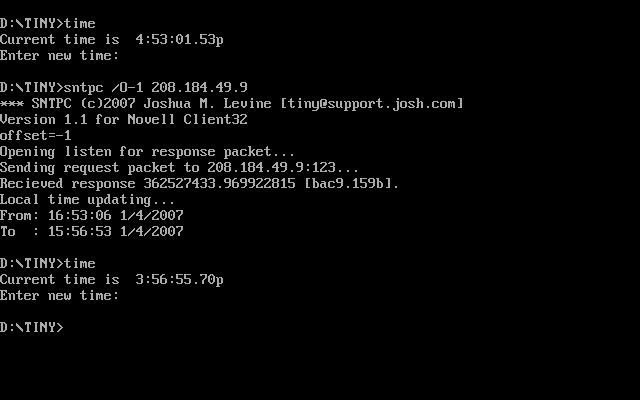
SNTPC is a very simple command-line utility that will let you sync the clock on a MS-DOS to a remote time server on the internet. There are lots of NTP clients in the world, but I think this is the only one available for MS-DOS machines.
| SNTPC.ZIP | for Novell TCPIP stack |
| SNTPC_F.ZIP | for FTP PCTCP stack |
SNTPC [/Ooffset] [/Pport] [/Wwait] [/Ccount] [/V] server_address
Where:
server_address is the TCP/IP address of an SNTP or NTP time server
(server must be NTP version 3 or higher)
offset is offset hours to be added/subtracted from received time
port is the optional TCP/IP port to send to
(port 123 is used if none specified)
wait is the optional time in TICKS to delay between requests
(default wait is 18 ticks which is about 1 second)
count is the optional number of requests to send before aborting
(default count is 5 tries)
/V specifies verbose mode where lots more diagnostic info is
printed
Returns:
0=Local clock successfully set
1=Timeout waiting for response from server (time not set)
2=Other error (time not set)
SNTPC /W24 /C5 /O-6 /V 216.254.1.23
Will attempt to set the local clock using the server at 216.254.1.23. It will make a maximum of 5 requests, and will wait up to 2 seconds after each request for a response before sending the next request. It will subtract 6 hours from the time returned from the server. It will print lots of helpful messgaes while running.
Q: How accurate is SNTPC?
A: Not very. SNTPC is very simple- it makes a request to the server and
then uses what ever time it gets in the response. It does not even attempt to
compute round trip delays or anything like that. Furthermore, the DOS function
that sets the local time only has a resolution to one second, so the time set
can be off by a maximum of one second plus the network delay between the time
server and the local machine.
Q: How can I find a time server to sync to?
A: You can use any NTP sever. You can find databases of public time servers
using google. There is also a list of NIST-maintained time servers
here.
Q: Which time server should I use?
A: The closer, the better since this will usually have lower delays. Also, it is
handy to use a time server that is in your local time zone so you can avoid
needing to specify an offset.
Q: Can I use SNTPC to sync the clock of my DOS machine to the clock on my Windows machine?
A: Sure. You'll need to be running an SNTP server on the Windows machine. There are many SNTP servers available for Windows, here is a free one...
http://www.ee.udel.edu/~mills/ntp/html/build/hints/winnt.html
Once you have the SNTP server running on the Windows machine, make sure the DOS machine can ping the Windows machine. If it can, you should be able to just run the SNTPC.EXE program on the DOS machine giving it the IP address of the Windows machine and it should get the time from the Windows machine.
Q: Can I specify the name of the time server rather than the IP
address?
A: Unfortunately, the DNS clients on the DOS tcpip stacks don't work so good, so you
must specify the IP address explicitly.
Q: How does SNTPC deal with time zones and daylight savings?
A: SNTPC will use TZ envronment
variable set in DOS. This defaults to US Eastern Time with daylight savings. If you want to set it
to, say, US Pacific time without any daylight savings, you could do...
SET TZ=PST08
...in DOS before running SNTPC.
Sadly, MSDOS has the switchover dates for daylight savings time hard coded into it and these dates were recently changed (at least here in the US where I live). Becuase of this, it is probably easier to set TZ to UTC0 and use SNTPC's offset to manually adjust your time zone. This way you can change the SNTPC batch file to change the offsets to account for different offsets at different times of year becuase of daylight savings.
So, for EST, you could have you batch file look something like this in winter...
SET TZ=UCT0

SNTPC /O-5 pool.ntp.org
...and like this in summer...
SET TZ=UCT0

SNTPC /O-4 pool.ntp.org
Q: I want to use SNTPC on my DOS machine, but don't have TCPIP.
A: There are a few popular TCPIP stacks for DOS. I like the Novell one mostly
because it is freely available and works well. Check out the TINY page
here to download the Novell stack. SMTPC uses my portable
DOS network interface, so it would be easy to recompile to work the the FTP
Software PCTCP stack also.
Q: How does the return value work?
A: This is the value that the DOS errorlevel variable is set to when SNTPC finishes. You
can check this value in a batch file. Here is an example of a DOS batch file
that will attempt to set the time using one NTP server, check to see if it was
successful, and if not try a second server...
@echo Trying NTP server in Gaithersburg, Maryland...
@SNTPC 192.168.15.1
@if not errorlevel 1 goto success
@echo Trying NTP server in Boulder, Colorado...
@SNTPC 132.163.4.101
@if not errorlevel 1 goto success
@echo ERROR,TIME NOT SET!!!!
@goto done
:success
@Echo Time set successfully!
:done
Q: What is the license for SNTPC?
A: You are free to use SNTPC in any non-commercial (educational, hobby,
personal) application. If you really like SNTPC, you can give a tax deductible
donation to the
Aasha Foundation.
If you wish to use SNTPC in a commercial application, please contact me first at the email address below. Full source code is available.
Q: How do I get SNTPC to work in a Windows command prompt?
A: You can't- the whole point of SNTPC is that it is for DOS!
You can get many fine programs for Windows that will automatically keep your local lock in sync with an SNTP server. There is even one built into Windows!
Q: But I *really* just like SNTPC, how can I run it under
Windows?
A: Ok, here is a program I wrote just
for you. It is basically the same as SNTPC except it will run from a Windows
command prompt. It was based heavily on nice code I found
here.
4/1/2007 - First published
10/18/07 - Added link to Windows SNTP server in the FAQ.
4/15/08 - Added info on NTP clients for Windows. Added link to Aasha.
6/3/10 - Updated version to 1.20. Added more informative text for network errors.
10/1/2010 - Updated to version 1.30. Changed some interrupt code to try to fix problems with the problem not exiting correctly on some network cards.
4/1/2011 - Updated to version 1.40. Fixed a bug with handling offesets greater than 10 hours. Thanks Hoyodal in Korea (offset +14) !
4/10/2011 - Updated to version 1.50. Added a whole bunch of new diagnostics when verbose mode is on. Added new /S option. Updated description of TZ variable.
2/27/2012 - Updated TimeSync.exe to (1) inlcude a reference to System.Net to avoid DnsPermision errors, and (2) fixed the help screen text to show options in the correct order.
2/27/2012 - Added a version of SNTPC_F.EXE compiled for the FTP Software PCTCP stack.
For support, please email me at...
